

One scene, the same instructions
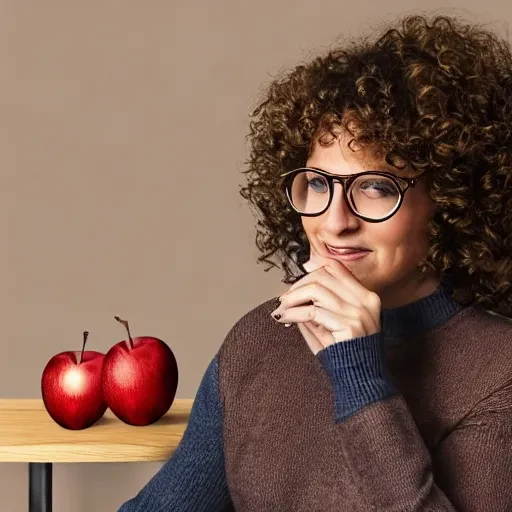
One woman, three apples, a glass of water and a sign saying GOOD MORNING. We gave twelve models the same prompt. Here are all 22 results, from SD1.5 to GPT Image 2.
The pair above shows the first SD1.5 and GPT Image 2 results. Open the original SD1.5 image and original GPT Image 2 image, then explore every model below.
The scene is deliberately ordinary. You do not need to understand model architecture to count the apples, read the sign or notice a pair of glasses melting into a face. Open the originals and see which picture you prefer.
What to look for
Start with the details the prompt actually asks for:
- The person: an adult woman, short curly dark brown hair, round copper glasses and a navy knitted jumper.
- The objects: exactly three red apples and one clear glass of water on a wooden table.
- The words: a sign reading GOOD MORNING against a cream wall.
- The light: soft daylight from the left, with natural skin texture and sharp focus.
A convincing face can distract from a missing apple. A perfectly spelled sign can sit inside an otherwise odd picture. Keep both the whole image and the small details in view.
SD1.5 · 2022
Stable Diffusion 1.5 starts our comparison in 2022, generating at 512 pixels. We use a community demo of the original model to see how it handles the portrait and the details around it.
Free publisher/community browser demo · 512 × 512 · 1 sample.
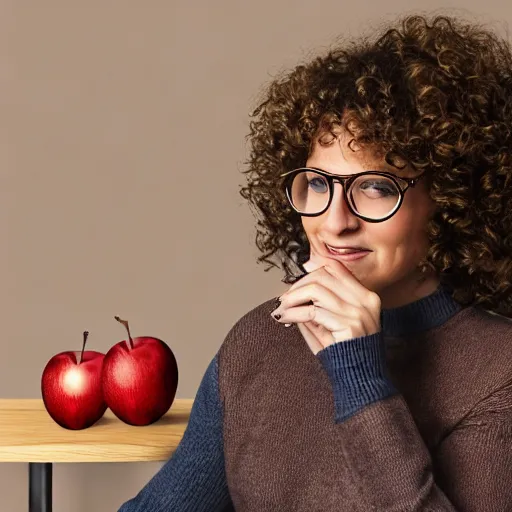

SD1.5 gives us two apples, thick dark glasses and a brown-and-navy jumper. The water glass and wall sign are missing.
Settings
- Output
- 512 × 512
- Samples
- 1; seeds 42
- Steps
- 30
- CFG
- 7.5
- Repository declared by community demo
- stable-diffusion-v1-5/stable-diffusion-v1-5
- Negative prompt
- Empty or zeroed in exposed local/demo setup
- Prompt
- Same submitted text; no reference images or follow-up edits
- Post-processing
- Original exports unchanged; smaller WebP copies for page display only
SD2.1 · 2022
SD2.1 introduced a different text encoder and a 768-pixel checkpoint. This community demo lets us try that version with the same scene.
Free publisher/community browser demo · 768 × 768 · 1 sample.
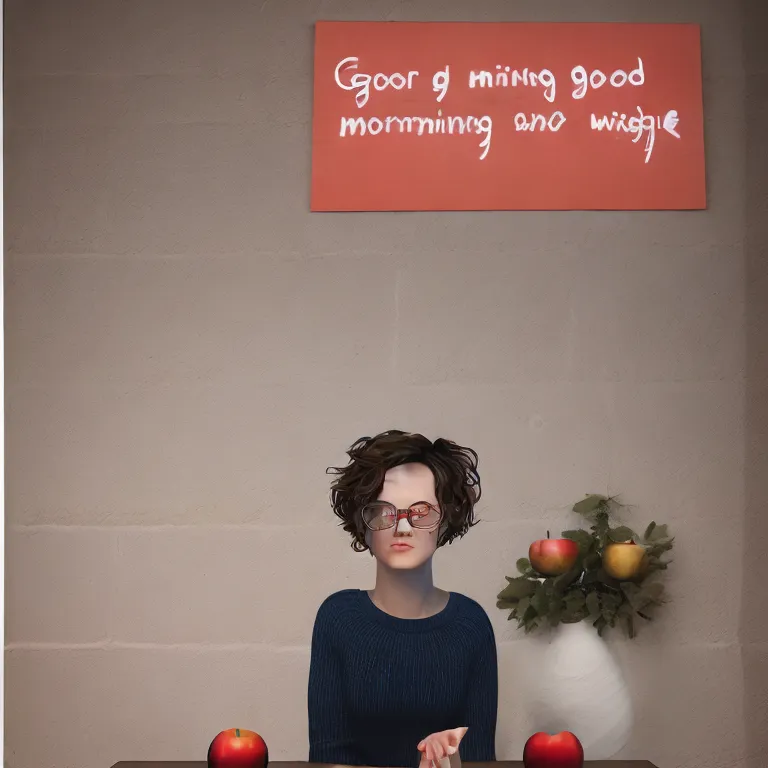

Two apples sit on the table, with extra fruit in the background plant. The water glass is missing, the sign has garbled lettering and the hands are distorted.
Settings
- Output
- 768 × 768
- Samples
- 1; seeds 42
- Steps
- 30
- CFG
- 7.5
- Repository declared by community demo
- sd2-community/stable-diffusion-2-1
- Negative prompt
- Empty or zeroed in exposed local/demo setup
- Prompt
- Same submitted text; no reference images or follow-up edits
- Post-processing
- Original exports unchanged; smaller WebP copies for page display only
Realistic Vision V5.1 (VAE)
Realistic Vision is an SD1.5 fine-tune focused on realistic imagery. We use V5.1 with its built-in VAE, released in 2023, and generate three portraits locally.
Local ComfyUI · 512 × 512 · 3 samples.
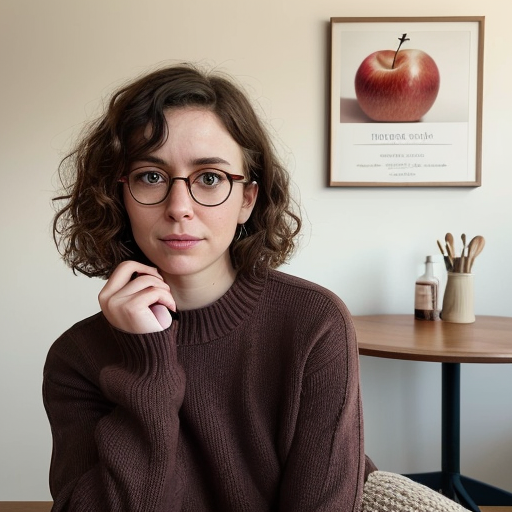

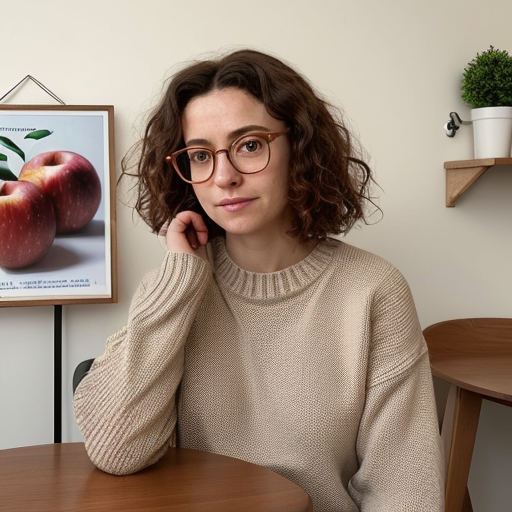

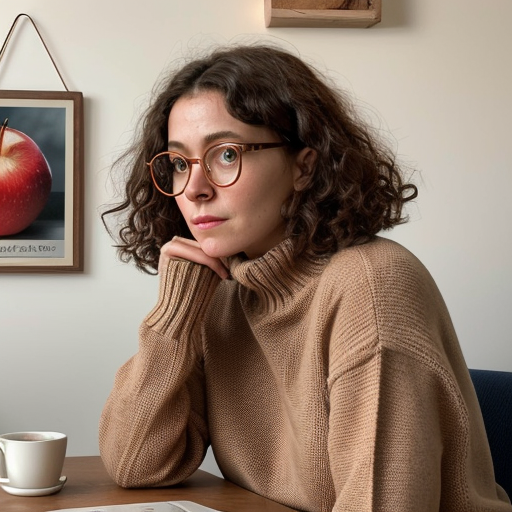

The curls and glasses appear in all three pictures, but the scene takes a different direction. The jumper turns brown or beige, and the apples become framed wall pictures. None includes the GOOD MORNING sign; the third adds a cup and saucer instead of the water glass.
Settings
- Output
- 512 × 512
- Samples
- 3; seeds 42, 43, 44
- Steps
- 25
- CFG
- 7
- Sampler
- dpmpp_2m
- Scheduler
- karras
- Checkpoint SHA256
- ef76aa2332635f4352463343beec9c5aae3bd107a73c0fd7221abbbcf8bd5470
- Negative prompt
- Empty or zeroed in exposed local/demo setup
- Prompt
- Same submitted text; no reference images or follow-up edits
- Post-processing
- Original exports unchanged; smaller WebP copies for page display only
Model by SG161222. The exact file matches Realistic Vision V5.1 (VAE), version 130072.
SDXL 1.0 base
SDXL moves Stable Diffusion to 1024-pixel images. We use the base model with the optional refiner switched off.
Free publisher/community browser demo · 1,024 × 1,024 · 1 sample.
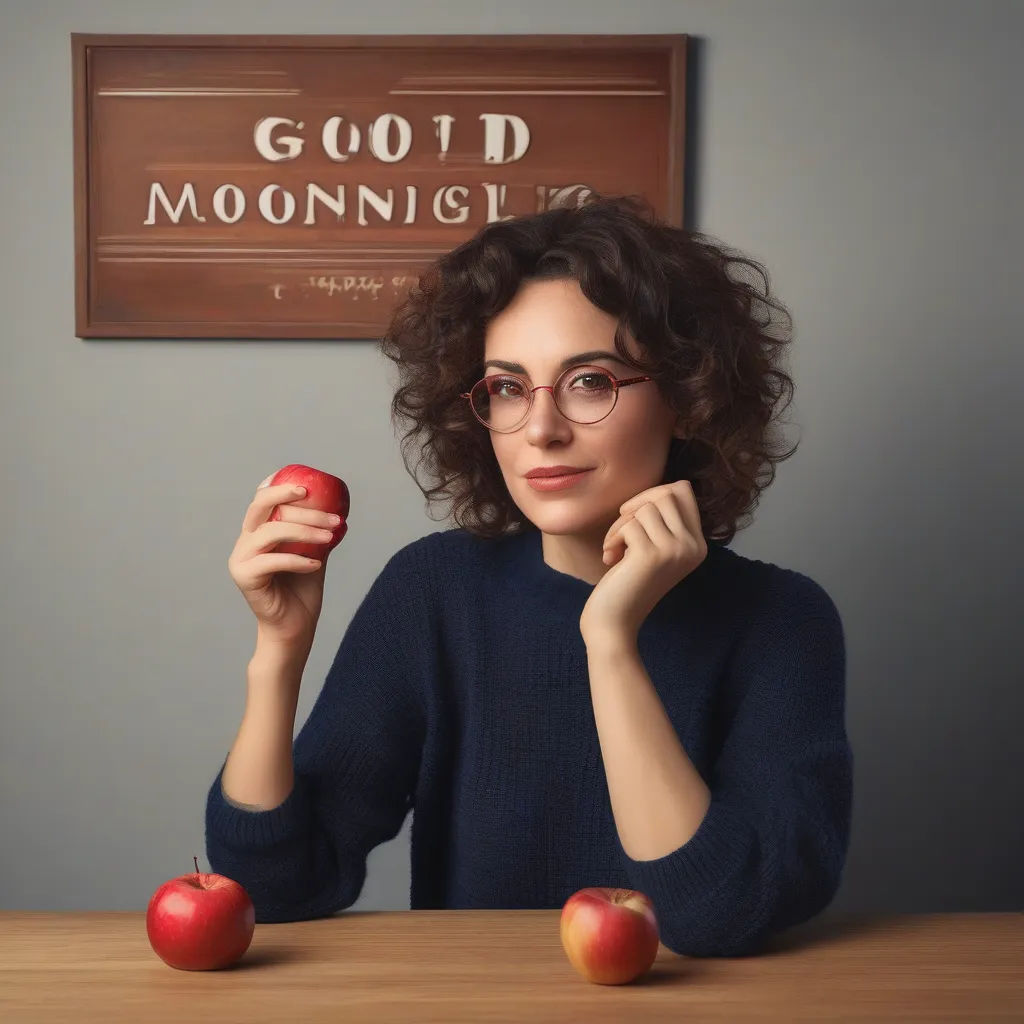

SDXL gets three apples into the picture, but one is in her hand and only two sit on the table. The navy jumper, curls and glasses are there. The water glass is missing and the sign is unreadable.
Settings
- Output
- 1,024 × 1,024
- Samples
- 1; seeds 42
- Steps
- 25
- CFG
- 5
- VAE
- madebyollin/sdxl-vae-fp16-fix
- Negative prompt
- Empty or zeroed in exposed local/demo setup
- Prompt
- Same submitted text; no reference images or follow-up edits
- Post-processing
- Original exports unchanged; smaller WebP copies for page display only
- Refiner
- Off; alternate FP16-fix VAE listed above
DreamShaper XL v2.1 Turbo
DreamShaper XL Turbo is an SDXL fine-tune built for short sampling runs. Our three local images use its six-step recipe.
Local ComfyUI · 1,024 × 1,024 · 3 samples.
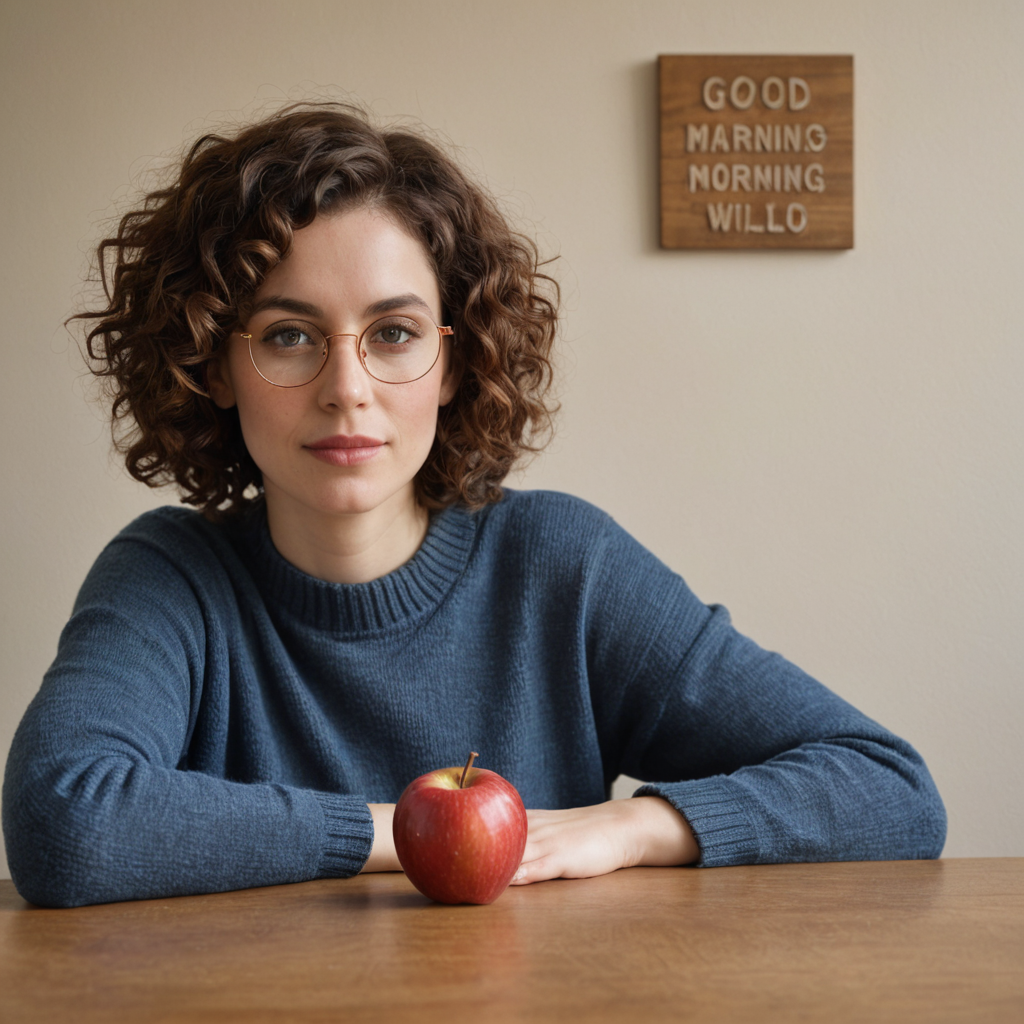

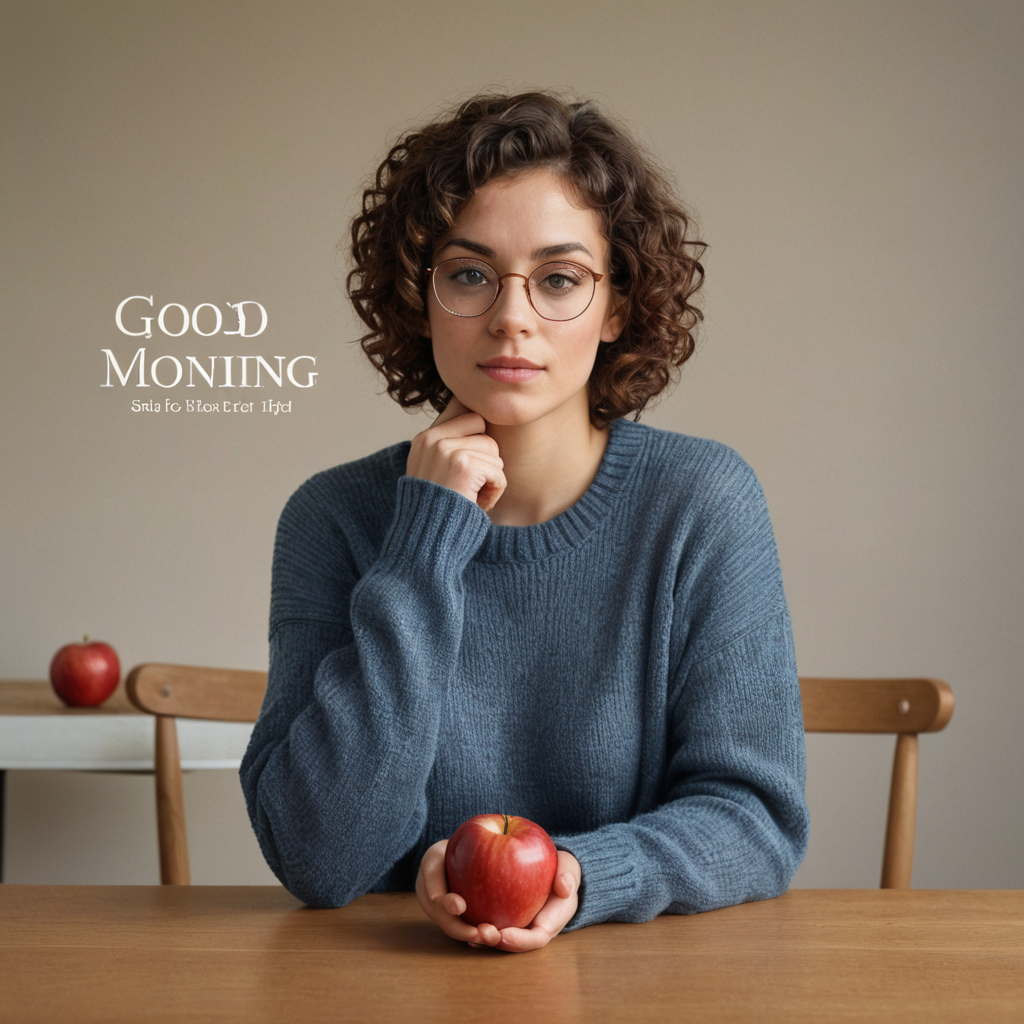

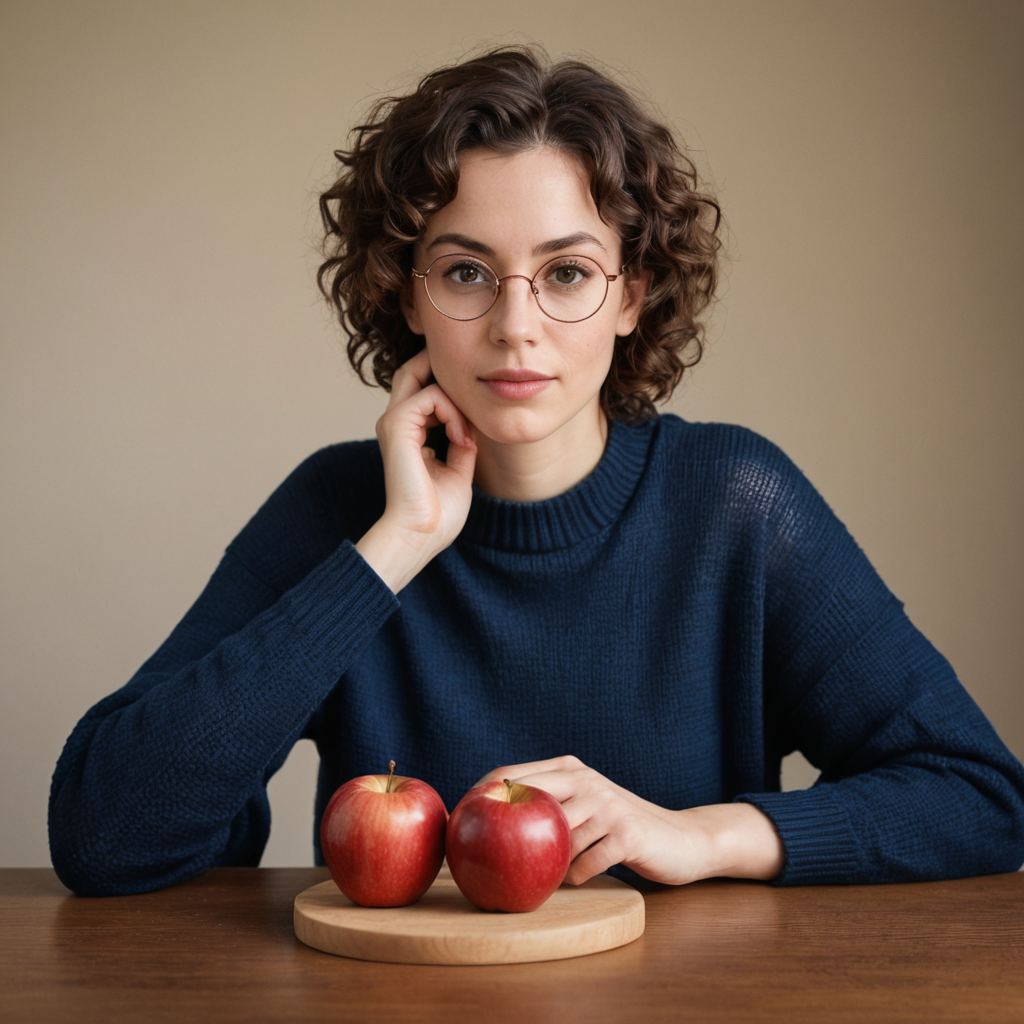

The blue knit, curls and round glasses carry through all three pictures. The apples move around: one in the first, one held and another in the background in the second, then two on a cutting board in the third. The water glass is missing throughout. The first two signs have incorrect lettering; the third disappears altogether.
Settings
- Output
- 1,024 × 1,024
- Samples
- 3; seeds 42, 43, 44
- Steps
- 6
- CFG
- 2
- Sampler
- dpmpp_sde
- Scheduler
- karras
- Checkpoint SHA256
- 4496b36d48bfd7cfe4e5dbce3485db567bcefa2bef7238d290dbd45612125083
- Negative prompt
- Empty or zeroed in exposed local/demo setup
- Prompt
- Same submitted text; no reference images or follow-up edits
- Post-processing
- Original exports unchanged; smaller WebP copies for page display only
Model by Lykon; exact checkpoint matched to the published DreamShaper XL v2.1 Turbo artifact.
FLUX.1 dev FP8
FLUX.1 dev brings a different model family into the comparison. We run the Comfy-Org FP8 version locally and keep all three samples.
Local ComfyUI · 1,024 × 1,024 · 3 samples.
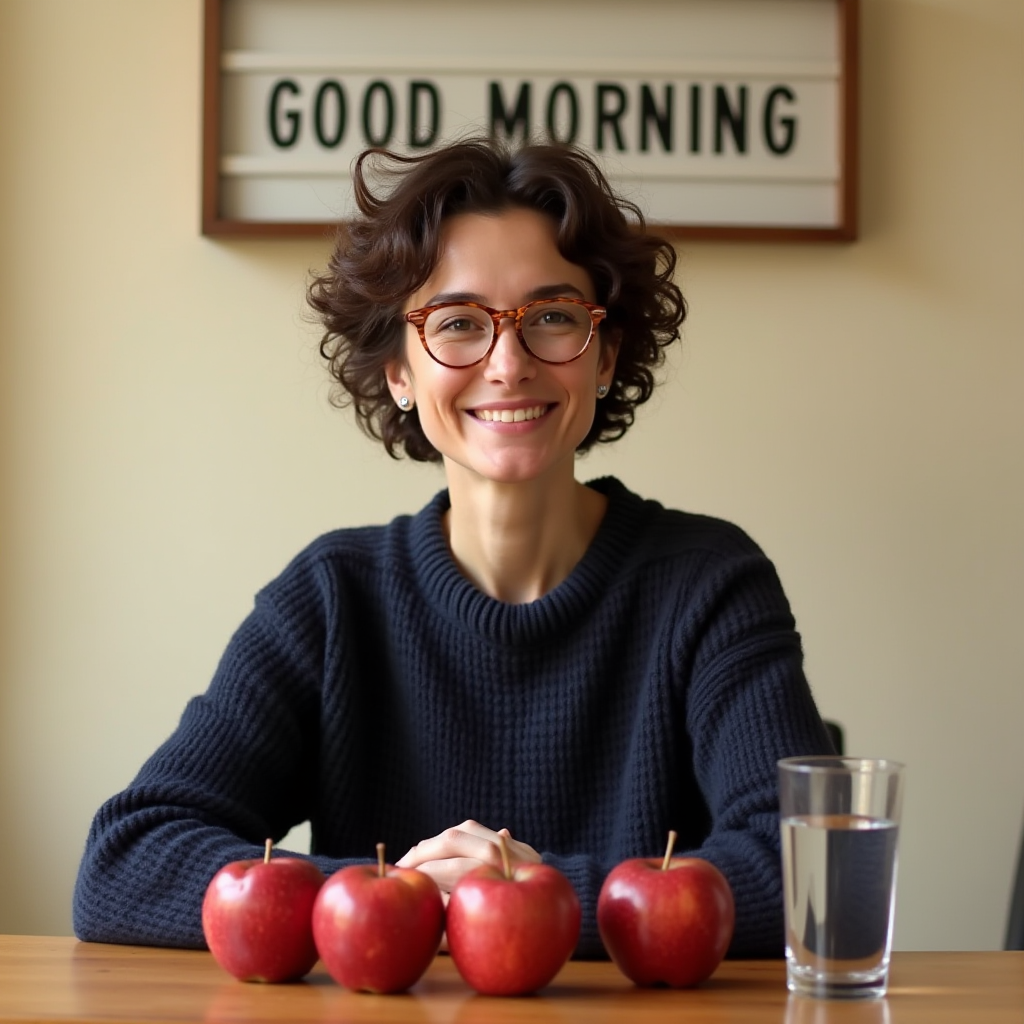

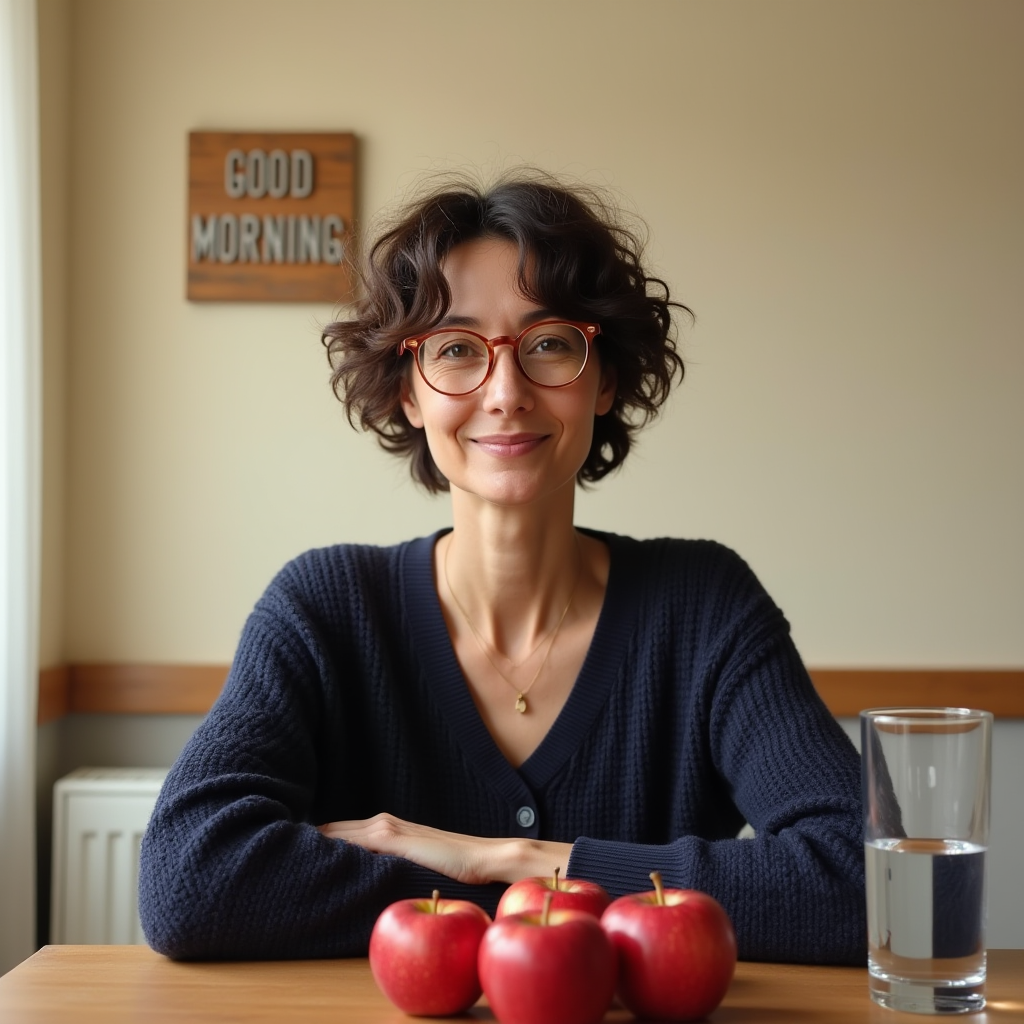

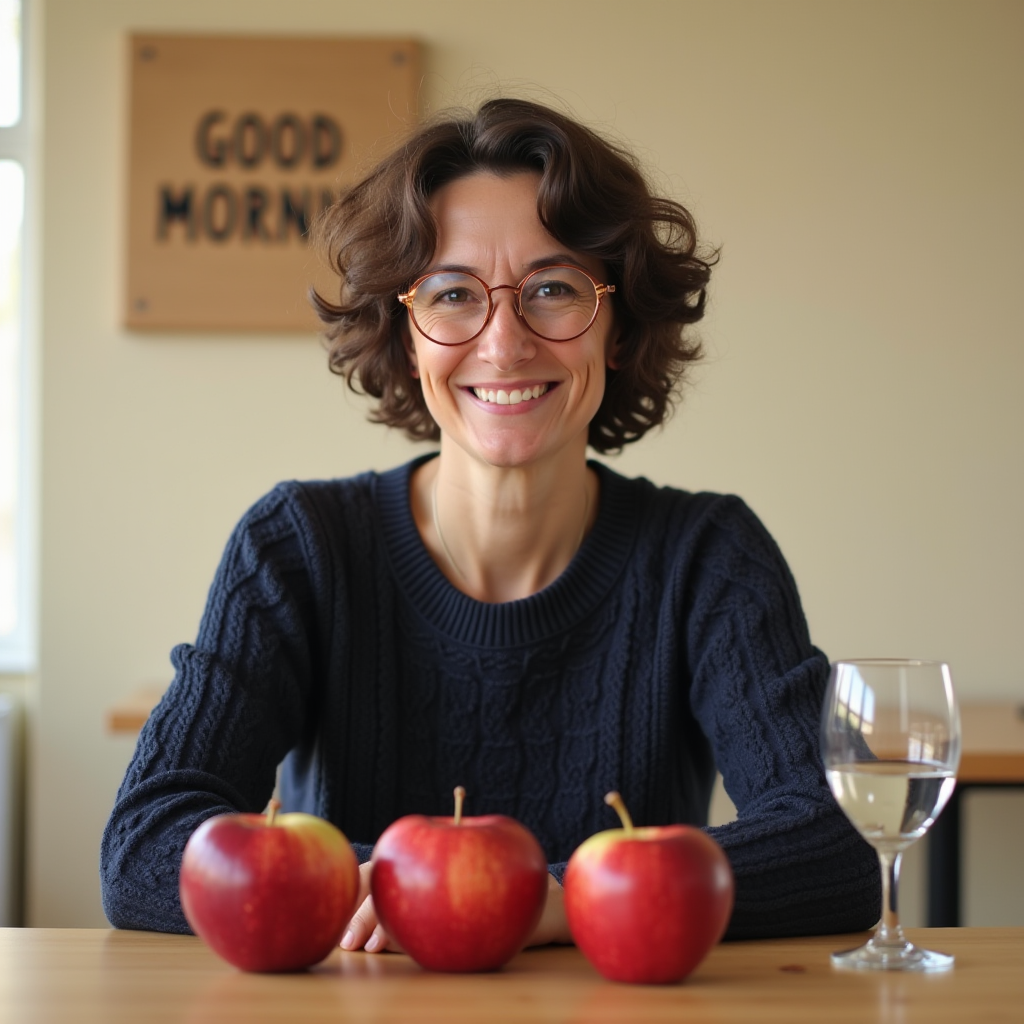

The first two pictures spell GOOD MORNING correctly, but both add a fourth apple. The third gets the apple count right, while its sign is blurred and partly hidden by her hair. The water glass appears in all three, and the second picture changes the jumper into a buttoned cardigan.
Settings
- Output
- 1,024 × 1,024
- Samples
- 3; seeds 42, 43, 44
- Steps
- 20
- CFG
- 1
- Sampler
- euler
- Scheduler
- simple
- FLUX guidance
- 3.5
- Checkpoint SHA256
- 8e91b68084b53a7fc44ed2a3756d821e355ac1a7b6fe29be760c1db532f3d88a
- Negative prompt
- Empty or zeroed in exposed local/demo setup
- Prompt
- Same submitted text; no reference images or follow-up edits
- Post-processing
- Original exports unchanged; smaller WebP copies for page display only
Stable Diffusion 3.5 Medium
SD3.5 Medium is a later member of the Stable Diffusion family. We try the publisher’s browser demo at 1024 pixels.
Free publisher/community browser demo · 1,024 × 1,024 · 1 sample.
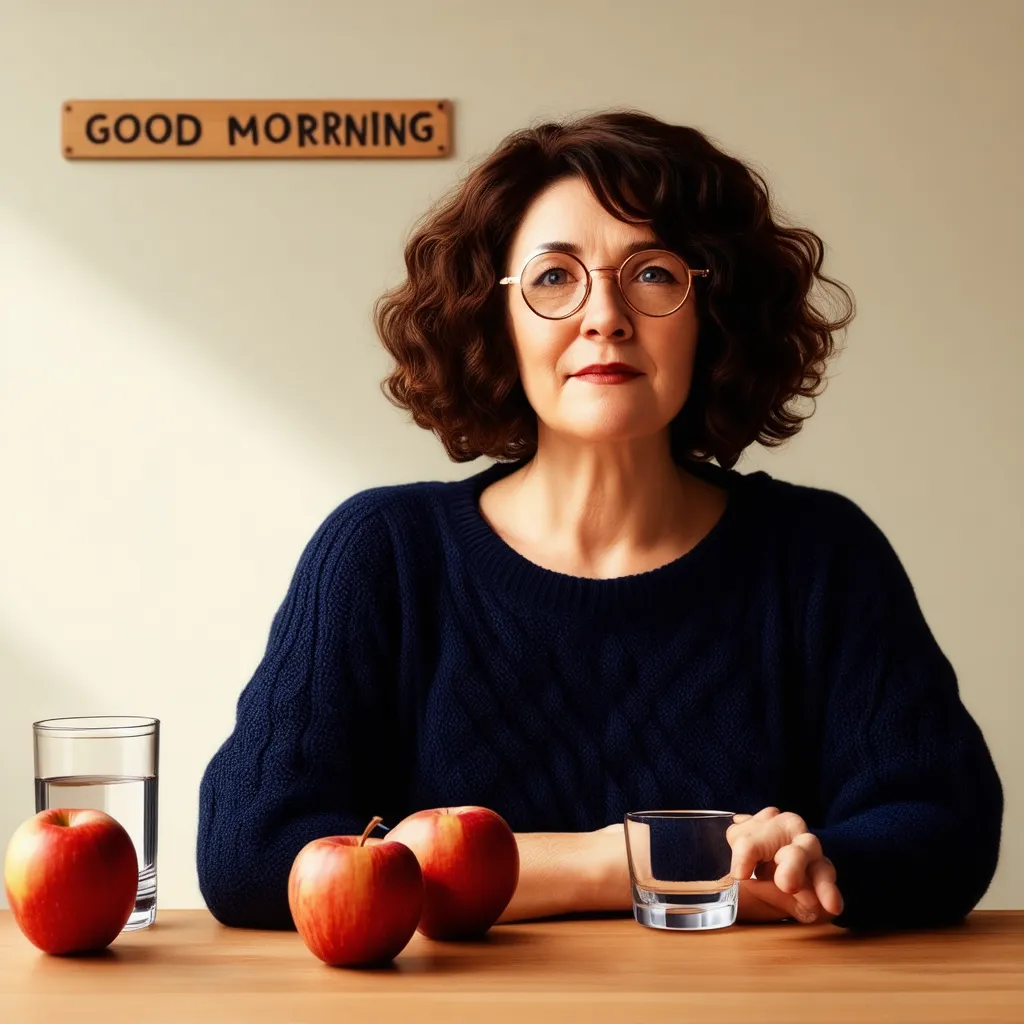

The three apples, navy jumper and round glasses are present. SD3.5 adds a second drinking glass and spells the sign GOOD MORRNING, with an extra R.
Settings
- Output
- 1,024 × 1,024
- Samples
- 1; seeds 42
- Steps
- 40
- CFG
- 4.5
- Negative prompt
- Empty or zeroed in exposed local/demo setup
- Prompt
- Same submitted text; no reference images or follow-up edits
- Post-processing
- Original exports unchanged; smaller WebP copies for page display only
Z-Image Turbo
Z-Image Turbo makes images in a small number of sampling steps. Our local INT8 ConvRot setup uses eight steps for each of these three pictures.
Local ComfyUI · 1,024 × 1,024 · 3 samples.
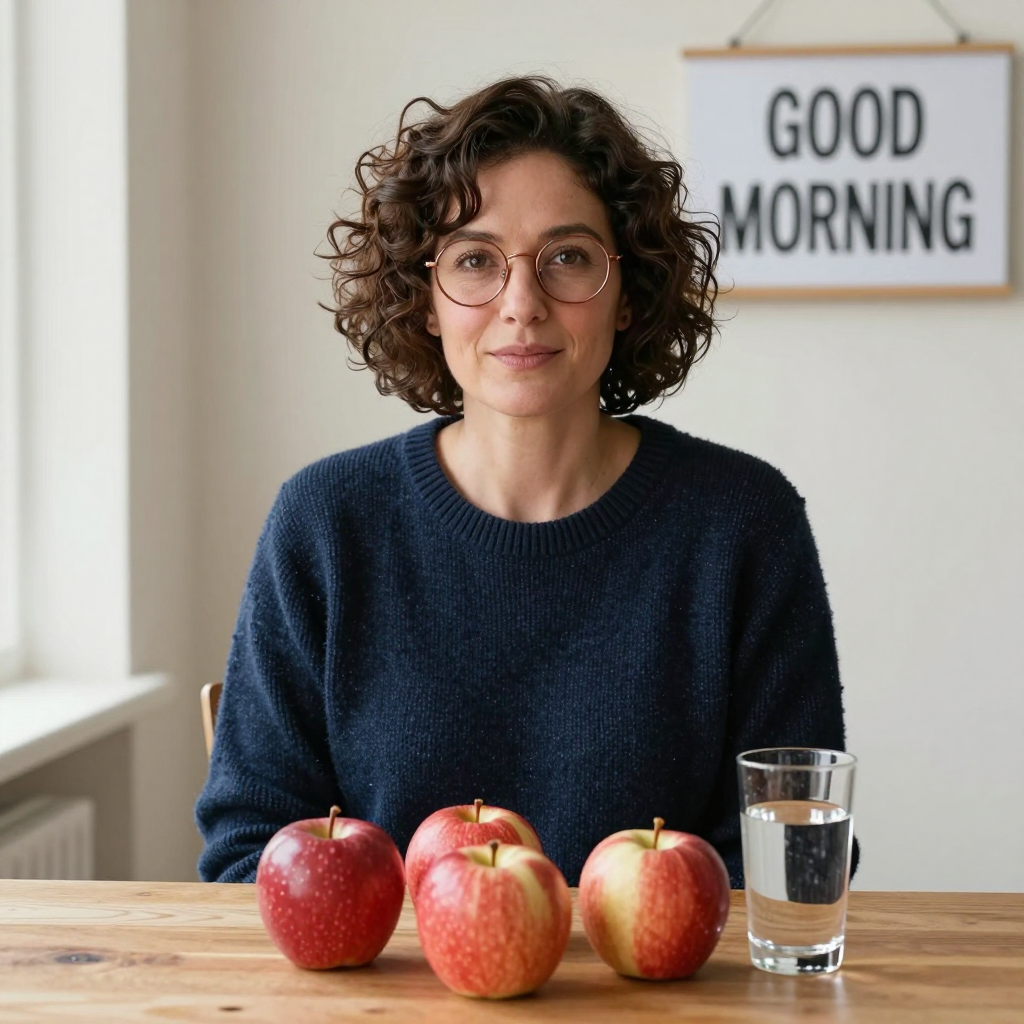

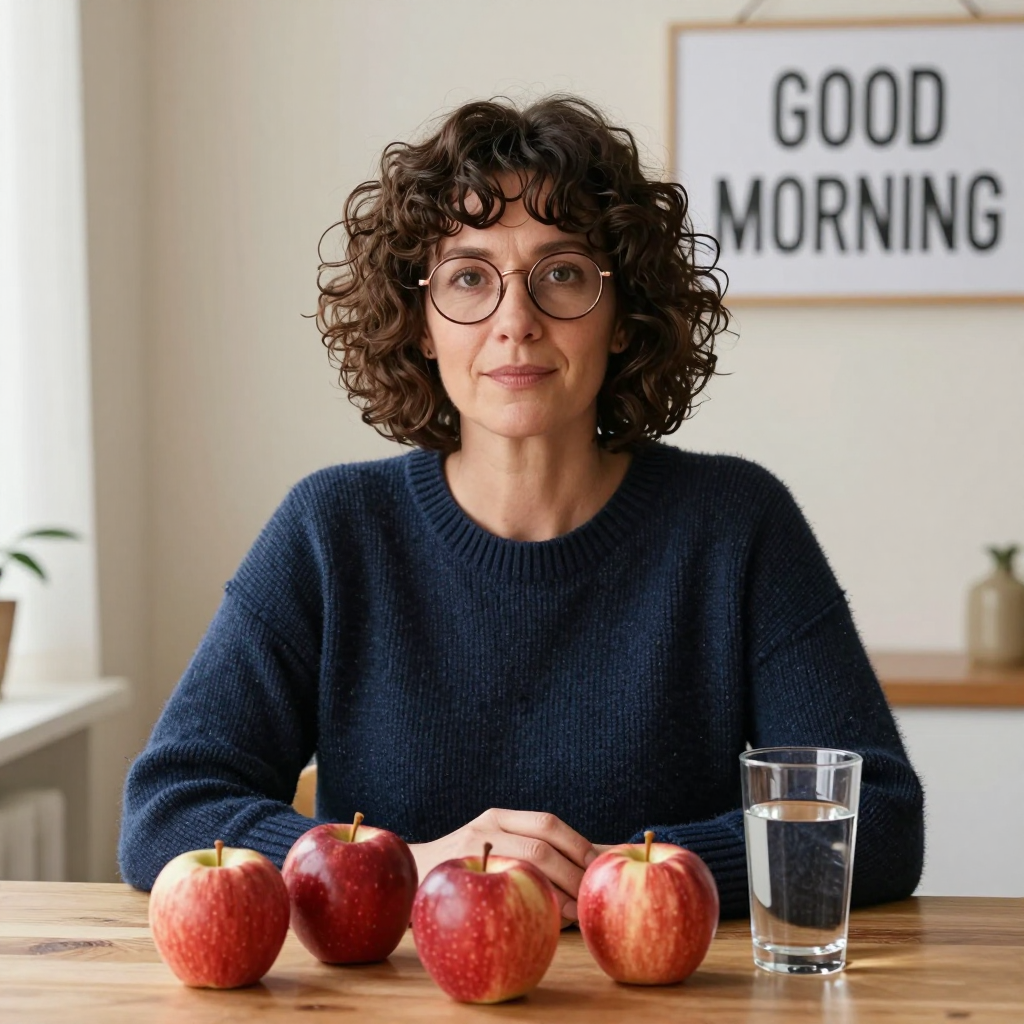

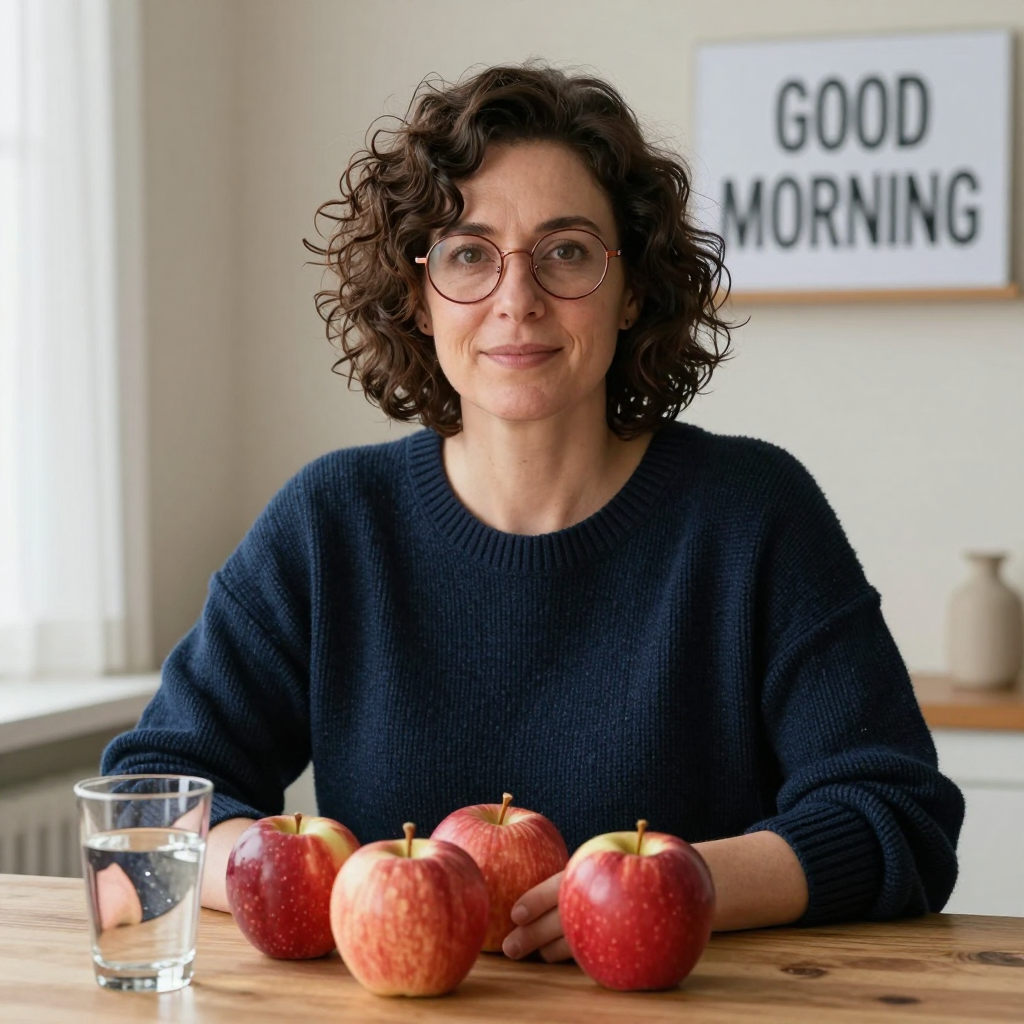

Z-Image keeps the navy jumper, water glass and readable GOOD MORNING sign across all three samples. It also adds the same extra object every time: four apples instead of three.
Settings
- Output
- 1,024 × 1,024
- Samples
- 3; seeds 42, 43, 44
- Steps
- 8
- CFG
- 1
- Sampler
- res_multistep
- Scheduler
- simple
- Flow shift
- 3
- Checkpoint SHA256
- be517ebd47c912a5626a588e1aeea43e6be4a43c0cdcd2b48a2a780d9f358635
- Negative prompt
- Empty or zeroed in exposed local/demo setup
- Prompt
- Same submitted text; no reference images or follow-up edits
- Post-processing
- Original exports unchanged; smaller WebP copies for page display only
- Components
- z_image_turbo_int8_convrot + qwen_3_4b_fp8_mixed + ae; CLIP type lumina2
FLUX.2 dev
FLUX.2 dev supports image generation and editing with reference photos. Here we use its publisher demo to make the scene from the prompt alone.
Free publisher/community browser demo · 1,024 × 1,024 · 1 sample.
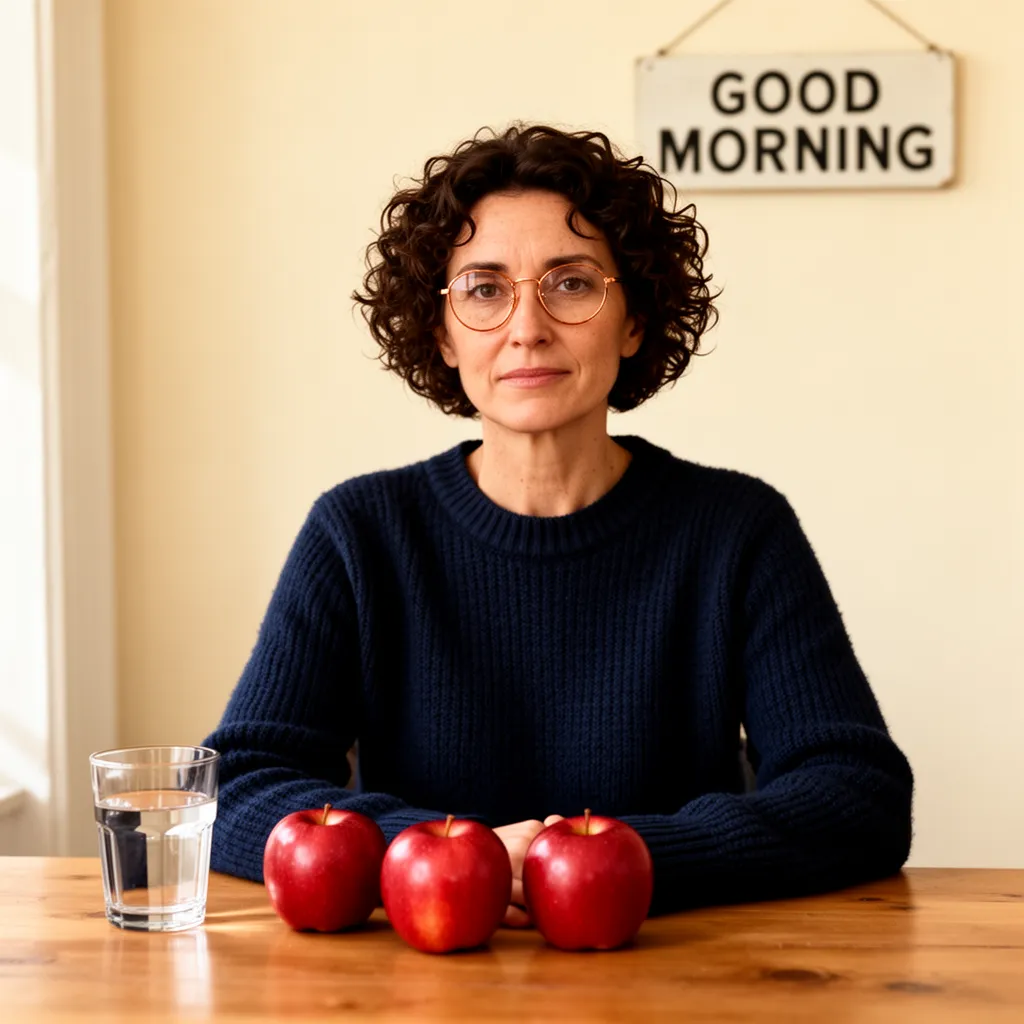

FLUX.2 dev gets the three apples, water glass, navy knit and GOOD MORNING sign right. The copper-coloured glasses are round, and a window on the left lights the scene.
Settings
- Output
- 1,024 × 1,024
- Samples
- 1; seeds 42
- Steps
- 30
- CFG
- 4
- Negative prompt
- Empty or zeroed in exposed local/demo setup
- Prompt
- Same submitted text; no reference images or follow-up edits
- Post-processing
- Original exports unchanged; smaller WebP copies for page display only
- Prompt enhancement
- Off; no reference images
FLUX.2 Klein 4B distilled
Klein 4B is the smaller, speed-focused FLUX.2 model. We use the distilled four-step version with prompt upsampling off.
Free publisher/community browser demo · 1,024 × 1,024 · 1 sample.
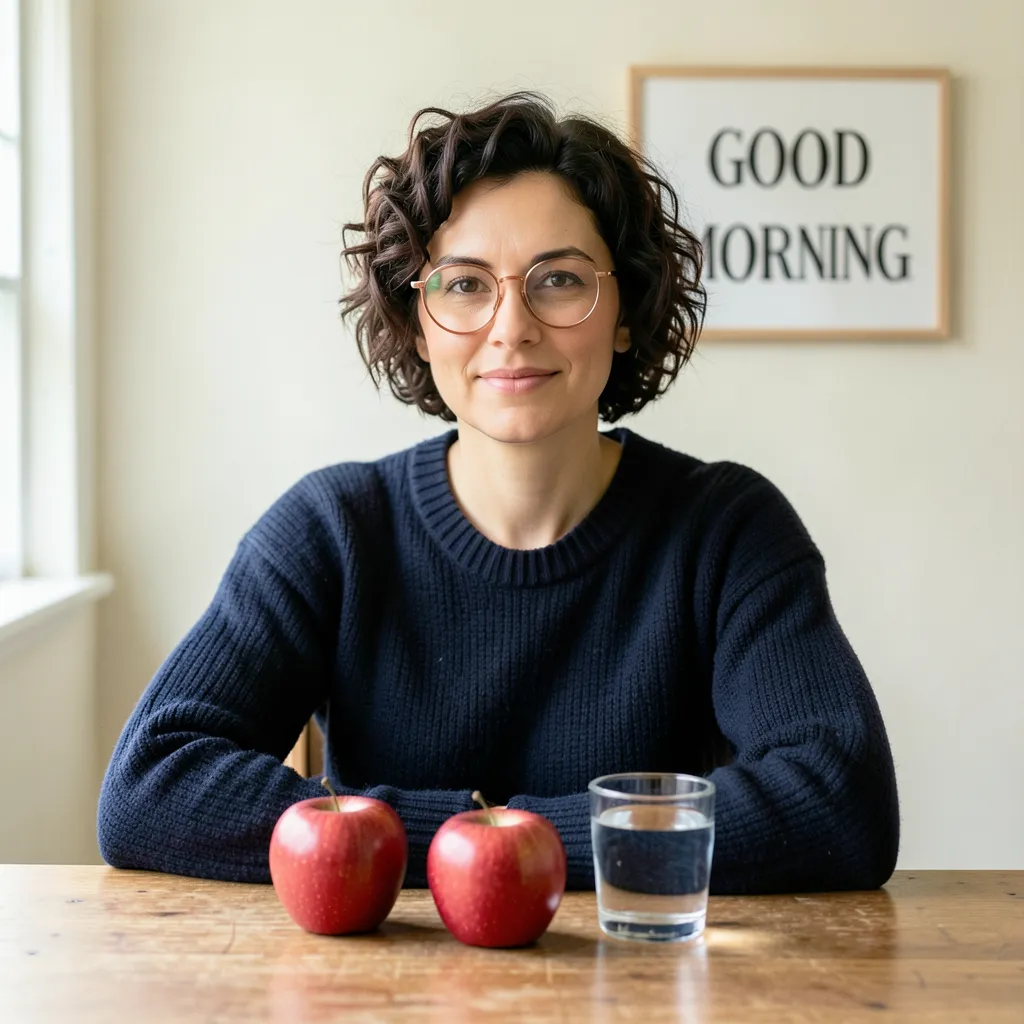

Klein spells GOOD MORNING correctly and includes the navy jumper and water glass. It puts two apples on the table, one short of the three we asked for.
Settings
- Output
- 1,024 × 1,024
- Samples
- 1; seeds 42
- Steps
- 4
- CFG
- 1
- Variant
- Distilled
- Negative prompt
- Empty or zeroed in exposed local/demo setup
- Prompt
- Same submitted text; no reference images or follow-up edits
- Post-processing
- Original exports unchanged; smaller WebP copies for page display only
- Prompt upsampling
- Off
Qwen-Image 2.1
Qwen-Image 2.1 combines image generation and editing. We use the publisher demo with prompt enhancement off and no reference pictures.
Free publisher/community browser demo · 1,024 × 1,024 · 1 sample.
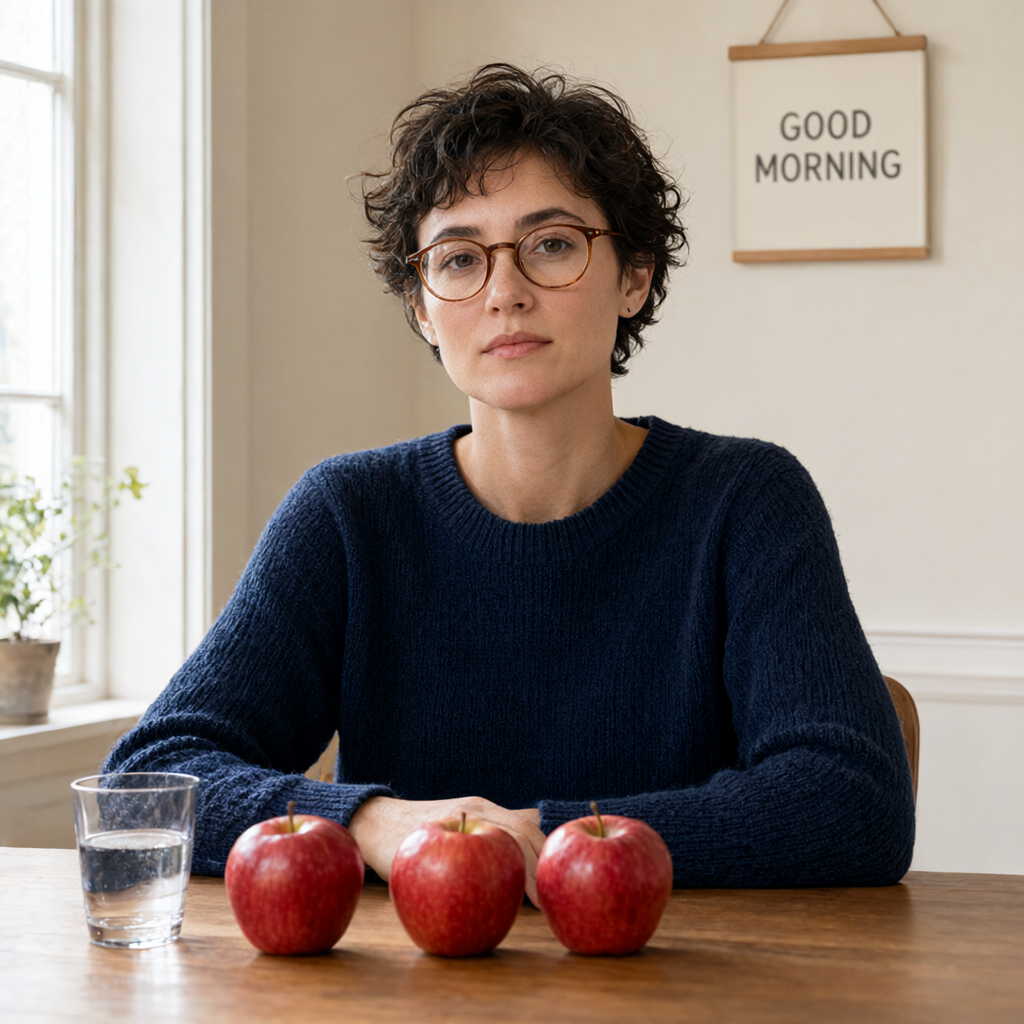

Qwen places three apples in a row beside one water glass. The sign reads GOOD MORNING, and the navy knit and short dark hair match the description.
Settings
- Output
- 1,024 × 1,024
- Samples
- 1; seeds 42
- Steps fixed in published demo source
- 40
- Variant
- Speed (1024px)
- Negative prompt
- Empty or zeroed in exposed local/demo setup
- Prompt
- Same submitted text; no reference images or follow-up edits
- Post-processing
- Original exports unchanged; smaller WebP copies for page display only
- Prompt enhancement
- Off; no reference images
- Other sampling controls
- Not exposed in the demo; hidden controls are not inferred from the result
GPT Image 2
GPT Image 2 is our hosted comparison, made through the built-in image tool. We submit the same prompt three times and keep each result.
Included image-generation tool · 1,254 × 1,254 · 3 samples.


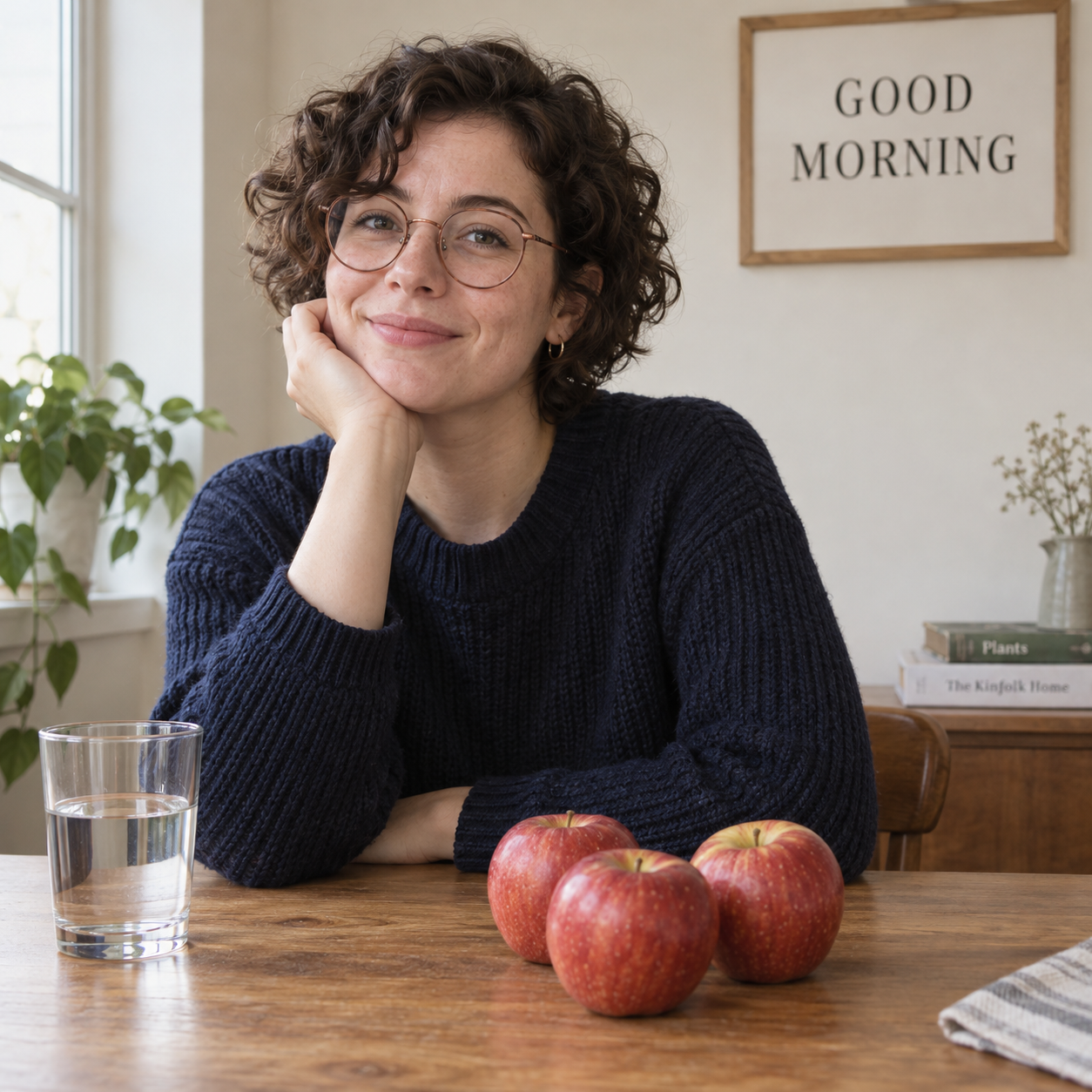

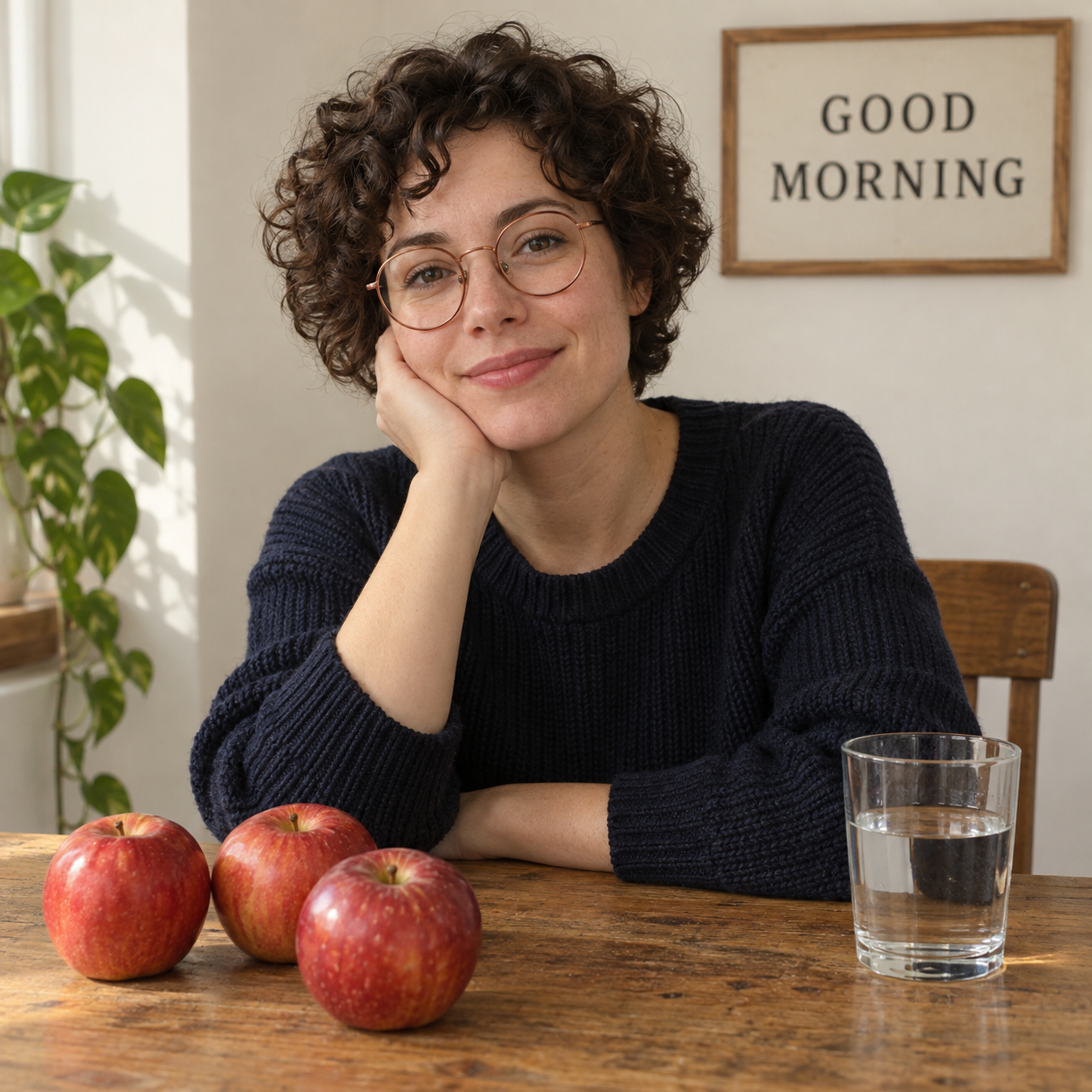

GPT Image 2 gets the three apples, water glass and GOOD MORNING sign right in all three samples. Each has the navy jumper and a bright window to the left. Open the originals for a closer look at the knit, skin and glasses.
Settings
- Output
- 1,254 × 1,254
- Samples
- 3; seeds not exposed, not exposed, not exposed
- Negative prompt
- Not exposed
- Prompt
- Same submitted text; no reference images or follow-up edits
- Post-processing
- Original exports unchanged; smaller WebP copies for page display only
- Model identity
- Built-in route documented as GPT Image 2; exact snapshot not exposed
- Sampling controls
- Seed, sampler, steps and internal conditioning not exposed
Try the prompt in your browser
The Try this model links beside the results open public model demos where available. You do not need to download their weights or install ComfyUI to use a hosted demo.
- Open the named demo. Use the app embedded in the Hugging Face Space page and select the named model or variant. A similarly named model is a different comparison.
- Copy our prompt below and paste it unchanged. Keep the quotation marks around “GOOD MORNING”. Do not add quality keywords or ask the service to improve the description.
- Choose a square image. Use the dimensions listed with that model's result when the demo exposes them.
- Switch prompt enhancement off where available. Leave the negative prompt empty where you can control it. For SDXL, leave the optional refiner off to reproduce a base-only run.
- Copy the recorded settings where the controls allow it. Keep a note of any setting the demo hides or fixes for you. If it exposes a seed, disable randomisation before entering the recorded number.
- Generate one image and wait for the result. A public demo may queue the job or ask you to sign in. Its free allowance is shared across your demo use; another tab does not necessarily give you more GPU time.
- Download the original. Use the result's download control, rather than saving a screenshot of the browser. Open the saved file and check its dimensions.
- Keep the first image before trying another. Name the file after the exact model and sample number, then save the prompt and settings beside it.
If your picture differs from ours, that is expected. Randomness, checkpoint versions, sampling settings and changes to the demo can all affect the result. A seed is useful within a matching setup; using the same number across different model families does not give them identical starting noise.
How we made the comparison
We used one unchanged prompt, with no reference images or follow-up edits. The four local setups and GPT Image 2 have three samples each; the seven free browser demos have one each. All 22 pictures are shown in generation order, with their original files linked beside them.
The models use different resolutions and sampling recipes, listed under Settings. SD1.5 and SD2.1 use community demos of preserved model mirrors. Realistic Vision and DreamShaper are fine-tunes of earlier model families. A shared seed number helps repeat a matching setup; it does not give different model families the same starting noise.
Repeat the local runs in ComfyUI
Our local runs used ComfyUI 0.37.0, frontend 1.52.7, Python 3.12.13 and PyTorch 2.14.0+cu130, on an RTX 5060 Ti with 16 GB VRAM.
If you already have the matching models, the reader pack contains the actual ComfyUI API graphs used for seeds 42, 43 and 44. These are API-format files, not drag-and-drop canvas workflows. They contain no model weights. For installation and the basic canvas, start with our first ComfyUI guide.
For Realistic Vision and DreamShaper, load the exact checkpoint with Load Checkpoint. Connect its CLIP output to two CLIP Text Encode nodes: one holds the unchanged prompt and the other is empty. Connect the model, both conditionings and Empty Latent Image to KSampler, then pass its samples through VAE Decode using the checkpoint's VAE. Finish with Save Image. Set batch size to one and denoise to 1. The settings above distinguish the 512-pixel, 25-step Realistic Vision run from the 1024-pixel, six-step DreamShaper run.
For our bundled FLUX.1 dev FP8 checkpoint, use the same checkpoint loader and text encoder route, but use EmptySD3LatentImage. Put FluxGuidance, set to 3.5, between the positive text conditioning and KSampler. Use 20 steps, CFG 1, Euler, simple scheduling and denoise 1, then decode and save. Do not assume a diffusion-only FLUX file contains the bundled encoder and VAE used here.
For Z-Image Turbo, load z_image_turbo_int8_convrot.safetensors with Load Diffusion Model, qwen_3_4b_fp8_mixed.safetensors with Load CLIP using type lumina2, and ae.safetensors with Load VAE. Encode the prompt; connect ConditioningZeroOut from that conditioning to the sampler's negative input. Route the model through ModelSamplingAuraFlow, shift 3, then use EmptySD3LatentImage at 1024 × 1024, batch one. KSampler uses 8 steps, CFG 1, res_multistep, simple and denoise 1. Decode with the loaded VAE and save.
Run an API graph on Windows
Start your own ComfyUI on 127.0.0.1:8188. Extract the reader pack, open PowerShell 7 in that folder and choose one of the supplied graph filenames. Make sure its model names match the files registered in your installation; edit a loader name if your folder layout differs, while retaining the same actual checkpoint.
$comparisonGraph = Get-Content -LiteralPath './realistic-vision-seed42.api.json' -Encoding UTF8 -Raw | ConvertFrom-Json -AsHashtable
$comparisonRequest = @{ prompt = $comparisonGraph } | ConvertTo-Json -Depth 40
$comparisonJob = Invoke-RestMethod -Uri 'http://127.0.0.1:8188/prompt' -Method Post -ContentType 'application/json; charset=utf-8' -Body ([System.Text.Encoding]::UTF8.GetBytes($comparisonRequest))
$comparisonJob.prompt_id
Wait for ComfyUI to finish, then find the PNG in ComfyUI's output/HowDoesAIDoThat/model-progression/ folder and reopen it. Run the seed-43 and seed-44 graph files separately if you want the same three-sample sequence.
If ComfyUI rejects a model name, select your registered matching file and check its identity. If it reports a missing node, compare your installed core version with ours. If memory runs out, keep batch one and close other GPU workloads; changing resolution or precision creates a different setup, so record the change. The original model cards and component links are in the reader pack.
Keep the originals and make your own comparison
Save each downloaded image in its own model folder. Keep the exact prompt, settings and date in a text file beside it. If you make smaller copies for a gallery, retain the untouched original exports as well.
For a useful second experiment, change one requirement and repeat that new prompt across the same models. Try five apples instead of three, a longer sign or a different direction of light. That makes it easier to see which instruction caused the change.
If a browser demo hides its seed, save the picture and note the model, settings and date.
When a demo does not cooperate
The queue is long or the GPU allowance is exhausted. Keep the prompt and settings, then return after the allowance resets. You do not need to upgrade for this experiment. Free demos can also be paused or changed by their maintainers.
The demo silently adds words. Look for prompt enhancement, rewriting or a displayed revised prompt. Turn the option off if possible. If you cannot see or control it, record that limitation rather than claiming the setup is identical.
The model name does not match. Check the selected variant and the demo's source/model card. An updated version or fine-tune can be interesting, but give it its own label and settings.
The lettering is wrong or an object is missing. Keep that result. Those details are part of the experiment. A later edit or a more focused prompt is a separate task, not a replacement for the first image.
The download appears missing. Check your browser's Downloads panel. When the save finishes, reopen the file. A generated preview alone is not the original export.
Choose a route
| Route | Cost basis | What you need | What changes |
|---|---|---|---|
| Public Hugging Face model demosFree hosted demo | Shared free GPU allowance and queues; individual demo availability can change. | Browser and available named model demo. Some actions may require a free account. | No local model download. Record the actual variant and any settings the demo fixes or hides. |
| Local ComfyUIFree local | No provider generation-credit fee for an installed local model. Hardware, electricity, storage and setup remain your responsibility. | Compatible installed ComfyUI and the exact checkpoint/components listed with the local result. | More control over the recipe and saved workflow; hosted results may use a different setup. |
| ChatGPT image generationHosted account allowance | Existing account allowance; current plan and limits apply. | An account with image generation available. | An ordinary-language hosted reference. Record the underlying model where exposed, rather than assuming all ChatGPT interfaces use the same one. |
Provider links are ordinary links. Free local software still needs hardware, storage and setup time; inspect current provider terms before paying.
The exact prompt
Original scene description agreed with the owner. The same text is submitted to each model; observed service settings are recorded beside its results.
A realistic studio photograph of a fictional adult woman with short curly dark brown hair, round copper glasses and a navy knitted jumper. She sits at a wooden table with exactly three red apples and one clear glass of water. Behind her, a cream wall displays a simple sign reading “GOOD MORNING”. Soft daylight enters from the left. Natural skin texture, sharp focus and a square composition.Take the steps with you
Reader starter files
The unchanged prompt, comparison checklist, public settings for all 22 results, source links and twelve executed local ComfyUI API graphs. No model weights; original images are linked separately.
Download the starter packSources and method
Primary references checked 2026-10-12. Images made on 12 October 2026 using the same prompt. Each model section links its original exports, settings and model source.
- SD1.5 preserved model card; unaffiliated mirror
- Stability AI SDXL base model card
- Stability AI SD3.5 Medium model card
- Black Forest Labs FLUX.1 dev model card
- Black Forest Labs FLUX.2 dev model card
- Black Forest Labs FLUX.2 Klein variants
- Tongyi-MAI Z-Image Turbo model card
- Hugging Face ZeroGPU allowances and queues
- OpenAI image generation in ChatGPT and Codex
- Realistic Vision V5.1(VAE) by SG161222, exact version
- DreamShaper XL Turbo by Lykon
- Comfy-Org FLUX.1 dev FP8 checkpoint
- Comfy-Org Z-Image Turbo components
- ComfyUI prompt queue route
- SD1.5 community demo and declared model mirror
- SD2.1 community demo and declared 768-pixel model mirror
- Qwen-Image 2.1 publisher demo
- FLUX.2 dev publisher demo
- Standard Diffusers Stable Diffusion text encoding